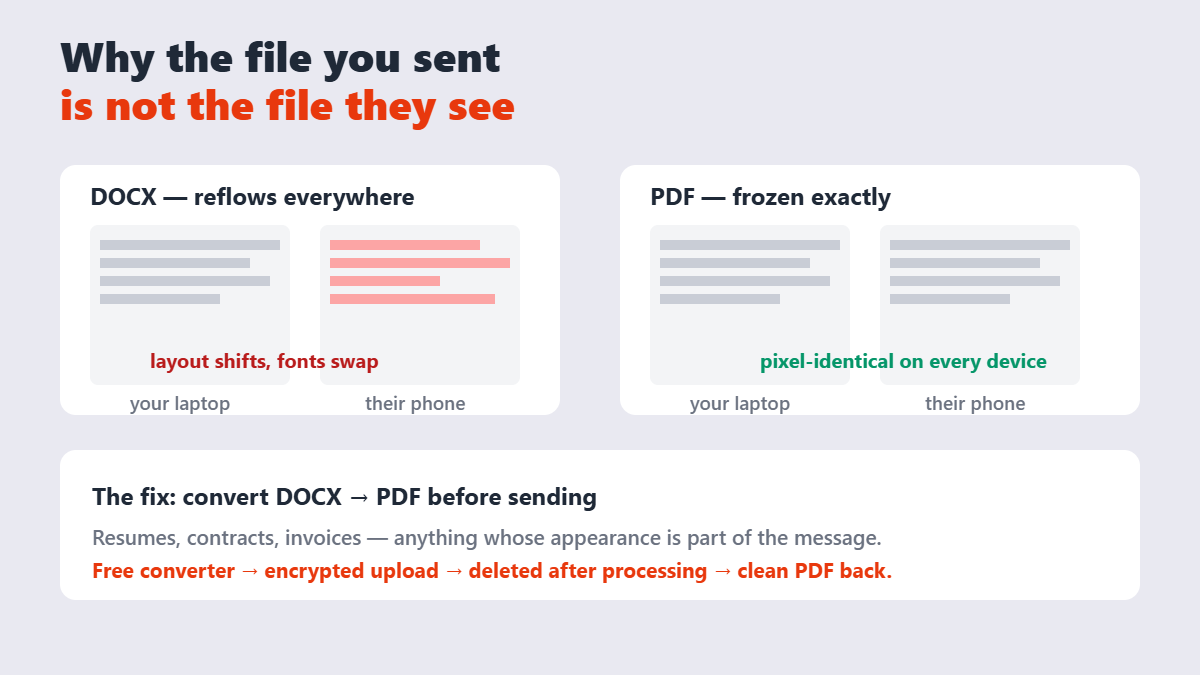
Here’s the uncomfortable truth about sending Word files: you have no idea what the recipient will see. Word documents reflow to fit whatever opens them — a different Word version, Google Docs, a phone — and every reflow is a chance for your two-page resume to become three ragged ones. Recruiters on r/resumes have beaten this to death: the formatting you spent hours on survives only in PDF.
Contents
- Why PDF wins for anything official
- How to convert Word to PDF (two ways)
- Do hyperlinks survive conversion?
- The 60-second pre-send checklist
- When NOT to convert
- FAQ
Why PDF wins for anything official
| Concern | Word (.docx) | |
|---|---|---|
| Looks the same everywhere | No — reflows by device and font availability | Yes — frozen layout |
| Recipient can edit it | Yes, accidentally easy | No, unless they go out of their way |
| Fonts render as designed | Only if the device has them installed | Yes — fonts embed in the file |
| Can be locked further | Limited | Yes — passwords, printing and copying restrictions |
That’s why resumes, contracts, invoices, and anything headed for a portal arrive as PDFs. The document’s appearance is part of the message, and PDF guarantees it survives the journey.
How to convert Word to PDF (two ways)
Way 1 — from Word itself. If you own Microsoft Word, File → Save As → PDF uses the same engine that rendered the document, so fidelity is perfect. It’s the gold standard when the software is in front of you.
Way 2 — online, no software. When you’re on a borrowed laptop or the document came from someone else, upload it to the Word-to-PDF converter: encrypted transfer, seconds of processing, and the file is deleted from the server afterward. This is a browser-based converter — the honest trade-off for getting real .docx rendering without Word installed.
Big-name alternatives — Adobe’s converter handles files up to 100 MB free — work the same way. The real differences are caps, sign-up walls, and how long your file sits on their servers.
Do hyperlinks survive conversion?
Usually yes — links applied as proper Word hyperlinks (Ctrl+K) carry into the PDF as clickable areas. But links that were just typed as plain text (“www.example.com” without the link formatting) arrive as dead text. Run through your document and convert any bare URLs to real hyperlinks before converting. It’s a thirty-second fix that saves an embarrassing “the link doesn’t work” reply.
The 60-second pre-send checklist
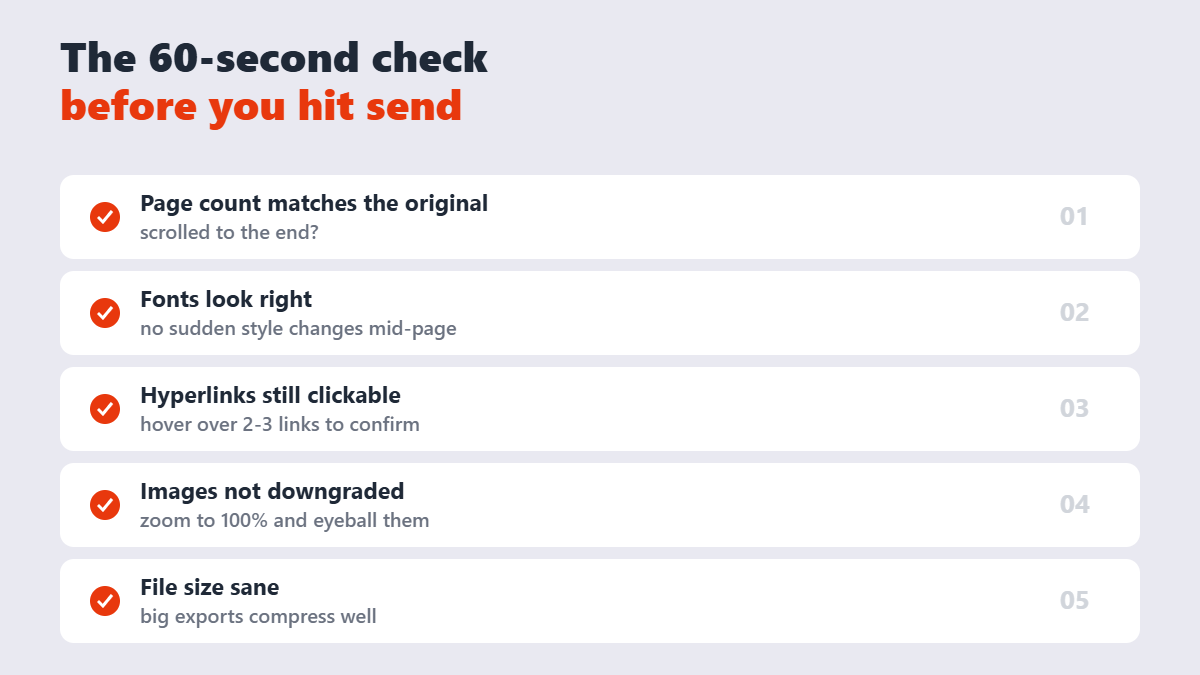
Run it every time. Conversion is reliable, but the source documents people feed it are not — a half-finished draft converts just as happily as a final one. The usual cause of a shifted Word-to-PDF conversion is fonts the converter cannot find. Word documents reference fonts by name; if the converting machine does not have that font, it substitutes the closest match and every line break can move.
When NOT to convert
One honest exception: some applicant tracking systems (ATS) parse simple Word resumes more reliably than heavily designed PDFs. If a job posting explicitly asks for .docx, send .docx — the employer’s software outranks your formatting. For everything else — contracts, invoices, portfolios, anything with a signature line — PDF is the right answer, and if you also need the recipient to make small edits, converting PDF back to Word later takes seconds.
FAQ
How do I convert Word to PDF for free?
Either use Word’s built-in Save As PDF, or upload the .doc/.docx to a free online converter like the one on Sejdaa and download the PDF seconds later — no signup, no watermark.
Will my fonts and formatting stay the same?
Yes — the converter embeds your fonts and freezes the layout, which is the entire point of PDF. What you see after conversion is what every recipient will see.
Do hyperlinks still work in the PDF?
Properly applied Word hyperlinks carry over as clickable links. URLs typed as plain text arrive as dead text, so convert bare URLs to real hyperlinks in Word before converting. DOCX stores content as XML inside a ZIP container, which is why the same document can be read by Word, LibreOffice and Google Docs. PDF stores fixed-position drawing instructions, which is why it looks identical everywhere but is far harder to edit back.
Can the recipient edit the PDF?
Not casually — PDFs don’t reflow in an editor the way Word files do. If you need edit protection too, add a password with the Protect PDF tool after converting.
Is it safe to upload my document online?
This converter transmits your file over an encrypted connection and deletes it from the server right after processing. For highly confidential documents, Word’s built-in Save As PDF keeps everything offline.
Why does my PDF look different from my Word document?
Usually it’s a font substitution on your own machine — if Word didn’t have the document’s font installed, it was already showing you a stand-in. Install the font or accept the substitute, then reconvert.