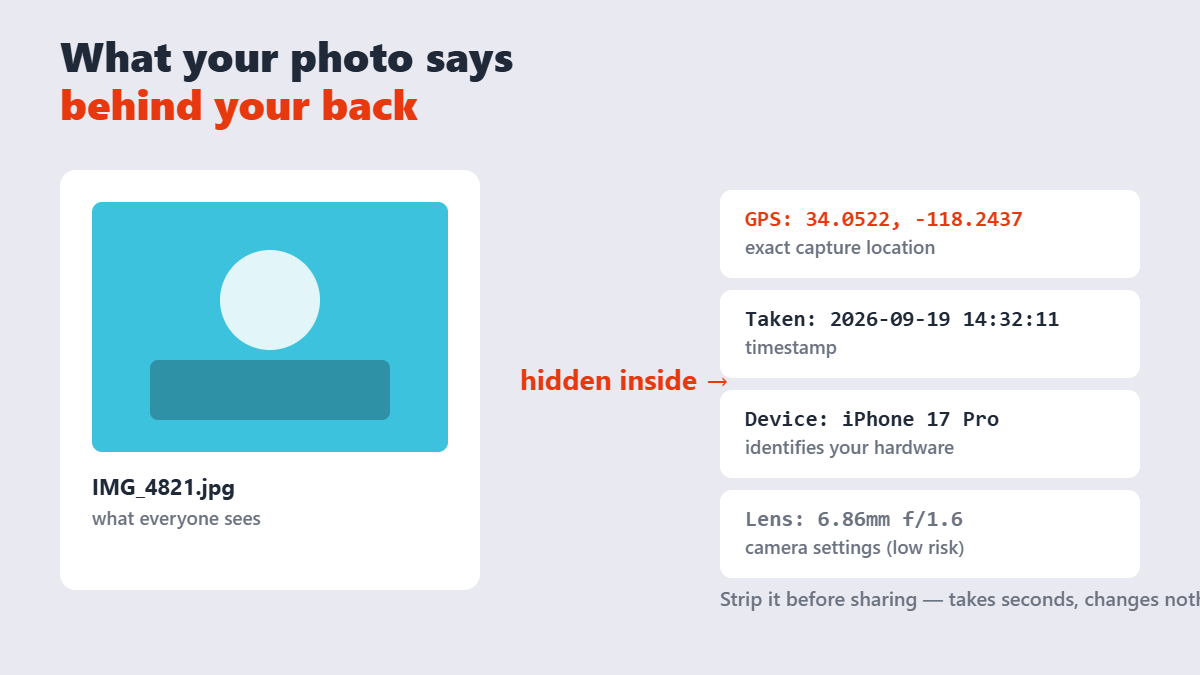
Every photo your phone takes carries a hidden passenger: metadata. Where you stood when you shot it, what phone you used, exactly when â all stitched invisibly into the file. Share that photo directly and you may have shared your home address, your kid’s school, or that you weren’t actually home yesterday.
The platforms are inconsistent about protecting you. Reddit’s own community threads confirm Reddit strips GPS tags from directly uploaded images â but external links keep their metadata, and other apps vary wildly. WhatsApp’s photo mode strips location; its document mode may not. The only safe assumption: if you didn’t remove it, assume it’s still there.
Contents
- What’s actually inside a photo file
- Who this matters for
- How to remove EXIF data, step by step
- The better long-term fix: never tag it
- Three misconceptions
- FAQ
What’s actually inside a photo file
| Metadata type | Example | Privacy risk |
|---|---|---|
| GPS coordinates | Exact latitude/longitude of capture | Highest â pinpoints homes, schools, routines |
| Timestamp | Date and second of capture | Correlates with your whereabouts |
| Device identity | Phone model, sometimes serial number | Links photos back to your hardware |
| Camera settings | Shutter, aperture, ISO, flash | Low â useful for photographers, harmless otherwise |
Photographers may want the camera settings preserved â that’s your creative record. GPS and device data are the fields almost nobody needs a stranger to have.
Who this matters for
Everyone posting photos of: their home’s exterior (coordinates reveal the address), children (routines and locations), secondhand items for sale (timestamps and serials aid fraud), travel (real-time location of an empty house), and documents â because ID photos and paperwork screenshots carry metadata too.
The classic warning scenario from privacy communities: a for-sale photo taken at home still carries the coordinates of your living room. Anyone who downloads the original file â not the compressed version most feeds show, the original â can plot it on a map.
How to remove EXIF data, step by step
- Open the EXIF Data Remover and drop your photos in. It runs entirely in your browser â the images never leave your device, which is the only acceptable privacy model for a privacy tool.
- The tool strips GPS, camera identity, and timestamps in one pass.
- Download the cleaned copies. Visually they’re identical â same pixels, same quality.
- Share the cleaned versions. Keep originals privately if you want the camera data for your own records.
Manual routes also exist: Windows’ file Properties â Details â “Remove Properties and Personal Information,” or Mac’s Preview inspector. They work, but they’re per-file, per-platform â a browser tool handles a batch in one pass. A file hash is a fixed-length fingerprint: MD5 produces 128 bits (32 hex characters), SHA-1 160 bits (40 characters) and SHA-256 256 bits (64 characters). Two files differing by a single bit produce completely different hashes.
The better long-term fix: never tag it
Removal is the cure; the vaccine is simpler. Turn off location access for your camera app (phone Settings â Apps â Camera â Permissions), and new photos simply carry no GPS data. Screenshot-as-share â a favorite low-tech trick from privacy communities â also produces a metadata-free copy, at the cost of compression artifacts.
My honest ranking of the three approaches: prevention first, batch removal for the backlog, screenshots only for one-offs you need right now.
Three misconceptions
- “The platform strips it anyway.” Some do, sometimes, for some upload paths. External links, documents, and API shares often pass metadata straight through.
- “Renaming the file removes metadata.” The filename is cosmetic â the EXIF block lives inside the file unchanged.
- “Compressing removes it too.” Often most of it, but “often” isn’t “always” â and some exporters add their own tags. Explicit removal is the only guarantee.
FAQ
Do photos really contain my location?
If your phone’s camera had location permission, yes â the GPS coordinates of where each photo was taken are embedded in the file. Check any photo in your gallery’s info panel to see it for yourself.
How do I remove EXIF data from photos for free?
Use a browser-based remover like the one on Sejdaa: drop the photos in, and download cleaned copies with GPS, timestamps, and device info stripped â processed locally, nothing uploaded.
Does removing EXIF data reduce photo quality?
No. EXIF metadata is stored separately from the image pixels â removal leaves the visible photo byte-for-byte identical. Two files with the same name and size are not necessarily identical, which is why checksums exist. Comparing a hash takes the same time for a 1 KB file and a 4 GB one, because the digest length is fixed regardless of input size.
Do Facebook and WhatsApp remove EXIF data?
Mostly, for most upload paths â but behavior varies by app, version, and upload mode (WhatsApp’s document sharing is a known gap). Removing the data yourself is the only method you control.
How do I stop my phone from tagging photos with location?
Revoke location permission for the camera app: Settings â Apps â Camera â Permissions â Location â Don’t allow. Future photos will carry no GPS tags.
Does a screenshot have EXIF data?
No â a screenshot creates a new image with no original metadata. It’s a quick one-off fix, though it slightly reduces image quality and adds no camera info of its own.