QR codes are everywhere, and so are QR horror stories: the restaurant menu that died when the “free” generator’s trial ended, the conference banner with a code too small to scan from the aisle, the printed poster whose code was actually the low-res preview. All three are avoidable with five minutes of knowing what you’re doing.
Contents
- Static vs dynamic: the choice that matters
- How to make a QR code, step by step
- Print rules: size, contrast, quiet zone
- The scan test (never skip it)
- The expired-code trap
- FAQ
Static vs dynamic: the choice that matters
| Static code | Dynamic code | |
|---|---|---|
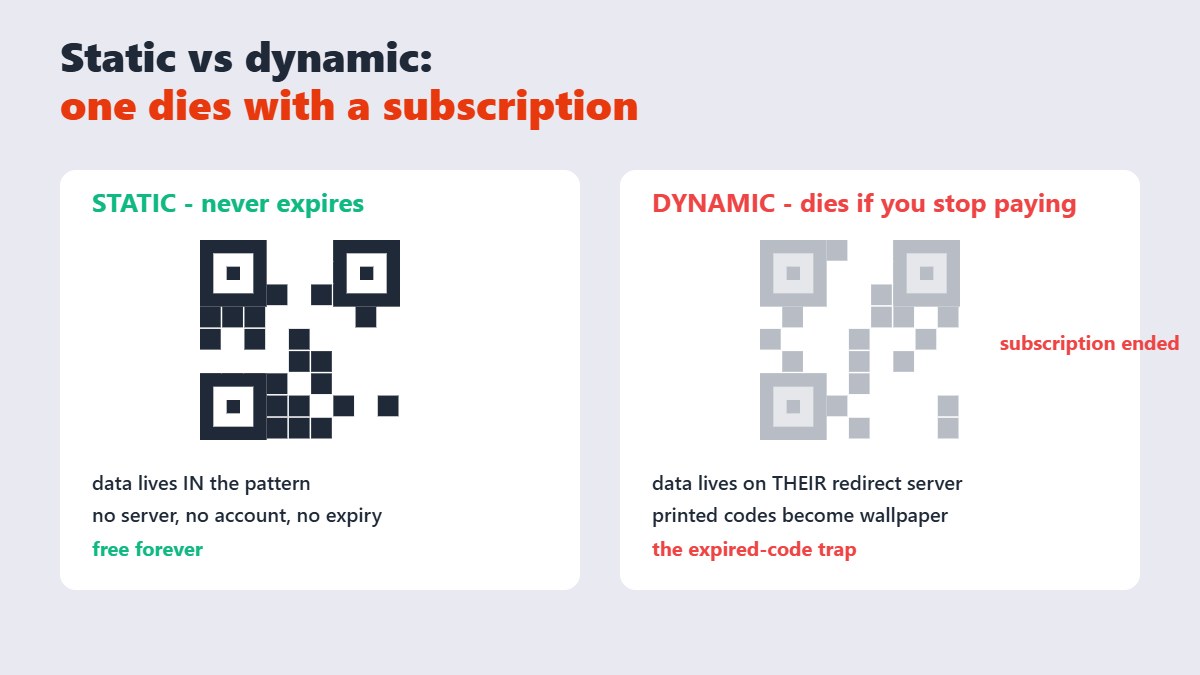
| Data location | Inside the pattern itself | On a redirect server you don’t control |
| Editable after printing | No | Yes (while the plan is active) |
| Expires | Never | Only if the provider’s trial or subscription lapses |
| Cost | Free forever | Often subscription-based |
| Best for | Menus, Wi-Fi, contact cards, permanent links | Marketing campaigns needing analytics |
The trap, documented in plenty of frustrated threads: generators advertising “free” codes that are actually dynamic codes on a trial. Six months later the redirect dies and every printed code becomes wallpaper. A static code from a generator like the QR tool on Sejdaa encodes your destination directly â there’s no middleman to expire, bill, or shut down. One honest limitation: a printed static code can never be edited afterward; fix the destination by printing a new code.
How to make a QR code, step by step
- Open the QR Code Generator and type your content â a URL, plain text, or contact details. The code renders in your browser instantly; the data never leaves your device.
- Download the image at high resolution. For anything headed to print, bigger is safer â a code scaled down prints fine, a low-res code scaled up doesn’t.
- Place it with room to breathe (see the print rules below).
- Scan-test with two different phones â one iPhone, one Android â from the actual distance and lighting it will live in.
Print rules: size, contrast, quiet zone
Size: the working rule is roughly one inch of code width per ten feet of scanning distance. A table tent needs an inch; a poster needs several. When in doubt, bigger.
Contrast: dark pattern on a light background. Inverted codes (light on dark) fail on many scanners, and a busy background bleeding through the pattern kills scannability.
Quiet zone: leave a blank margin around all four sides of the code â about four “pixels” of the pattern wide. Codes butted against text or edges scan erratically.
The scan test (never skip it)
Before printing a hundred menus or vinyl banners: scan the final artwork with at least two phones, under the lighting where it will actually live. Glossy laminate adds glare that screens don’t show. And check you’re printing the final code, not the preview thumbnail â the single most common print-shop heartbreak.
My honest take after watching QR deployments succeed and flop: the code is never the hard part. The destination is. A static code to a page you control â or better, a web page you actually maintain â outlives every campaign. Point it somewhere that will still exist next year.
The expired-code trap
Worth repeating because it’s the most expensive mistake in this whole space: if a “free” QR code requires an account, check whether it’s dynamic. A QR code needs a quiet zone — a blank margin of at least four modules on every side. Cropping into that margin is the single most common reason a printed code stops scanning. Dynamic codes work only while the redirect service stays active and paid. For anything permanent â shop signage, product packaging, a gravestone (yes, this happens) â use a static code. There is no rescue for a printed dynamic code whose subscription died.
FAQ
How do I create a QR code for free?
Type your link or text into a free static generator like the one on Sejdaa and download the image instantly. Static codes never expire and need no account â the data lives in the pattern itself.
Do free QR codes expire?
Static ones never do. “Free” codes that later expire were dynamic codes on a trial â they stop working when the trial or subscription ends. Check which type you’re getting before printing anything permanent.
Can I edit a QR code after printing it?
Not a static one â the data is baked into the pattern. You’d print a new code. Dynamic codes allow destination editing, but only while the provider’s service stays active. A QR code holds up to 2,953 bytes, 4,296 alphanumeric characters or 7,089 digits in its largest version (version 40). Practically, a URL of 50–80 characters encodes in a version 3 or 4 symbol, which is what keeps the pattern coarse and easy to scan.
What size should a printed QR code be?
Roughly one inch of code width per ten feet of scanning distance â bigger for posters and signage. Always leave a blank margin around the code and scan-test at the real distance.
Why won’t my QR code scan?
Usually one of: too small for the distance, inverted colors, no quiet-zone margin, a busy background, glare on a glossy finish, or a low-resolution image that was scaled up for print.
Can I put a QR code on a business card?
Yes â a static code with your contact details (vCard) or website, at least 2 cm across with a clear margin. Scan-test the actual printed card; business-card stock and small sizes are the classic failure combo.